
For hotels, guesthouses and holiday rentals in Germany and Austria
Book, check in, invoice. In a few clicks.
Destmio brings your booking calendar, guest registration, city tax and e-invoicing together in one system – live on every device, for one property or many.
- Free for 14 days
- No payment details needed
- Hosted in Germany
- VAT rates for DE and AT
- Guest registration DE and AT
- XRechnung and ZUGFeRD
- Live on every device
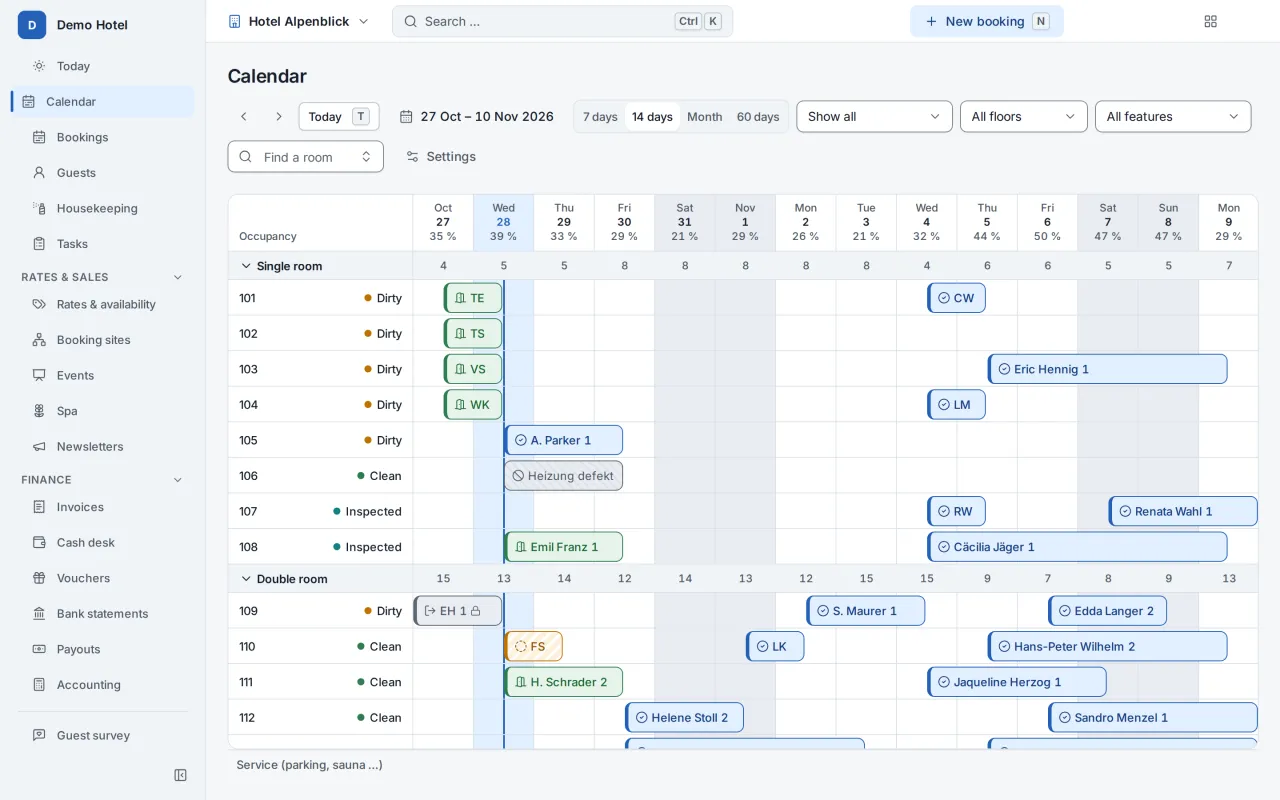

One product, every kind of stay
Fits the way you work. Not the other way round.
Choose your type of property when you start. Destmio sets the terms, taxes and features to match; switch on more whenever you need it.
-
Hotels
Booking calendar, housekeeping and billing – for the front desk and the floors.
- One-click check-in
- Live room status on the phone
- Several invoices per stay
-
Guesthouses and B&Bs
Per-person prices, a breakfast list and enquiries with offers – without hotel clutter.
- Per-person prices
- Breakfast list for the kitchen
- Enquiry, offer, online acceptance
-
Holiday apartments and homes
A calendar per apartment, cleaning between guests and self check-in – right from your phone.
- iCal sync with Airbnb, Booking.com and others
- Cleaners without an account of their own
- Access codes only once paid
Less paperwork
What costs you time today – and how it works with Destmio.
-
Before
Double bookings because calendars disagree.
With Destmio
One booking calendar for everything; the iCal sync warns you about overlaps.
-
Before
Registration forms on paper, typed up and filed.
With Destmio
Digital registration form: pre-filled, signed on screen, kept and deleted on schedule.
-
Before
Re-calculating city tax in a spreadsheet.
With Destmio
City tax by your municipality’s rules – on every invoice and in a report per filing period.
-
Before
Invoices in Word, numbers by hand.
With Destmio
Invoices with gapless numbers, locked once issued, as an e-invoice at the push of a button.
A day with Destmio
Every task in a few clicks. And we measure it.
Every daily task has a click budget that is checked automatically with every change, so Destmio stays fast as it grows.
3 clicks at most
Drag across free nights – and the booking is there.
Drag across free nights in the calendar or press Ctrl+K. Price, room and dates come pre-filled.
- Availability per room type at a glance
- Automatic room assignment
- Instantly visible to every colleague
1 click
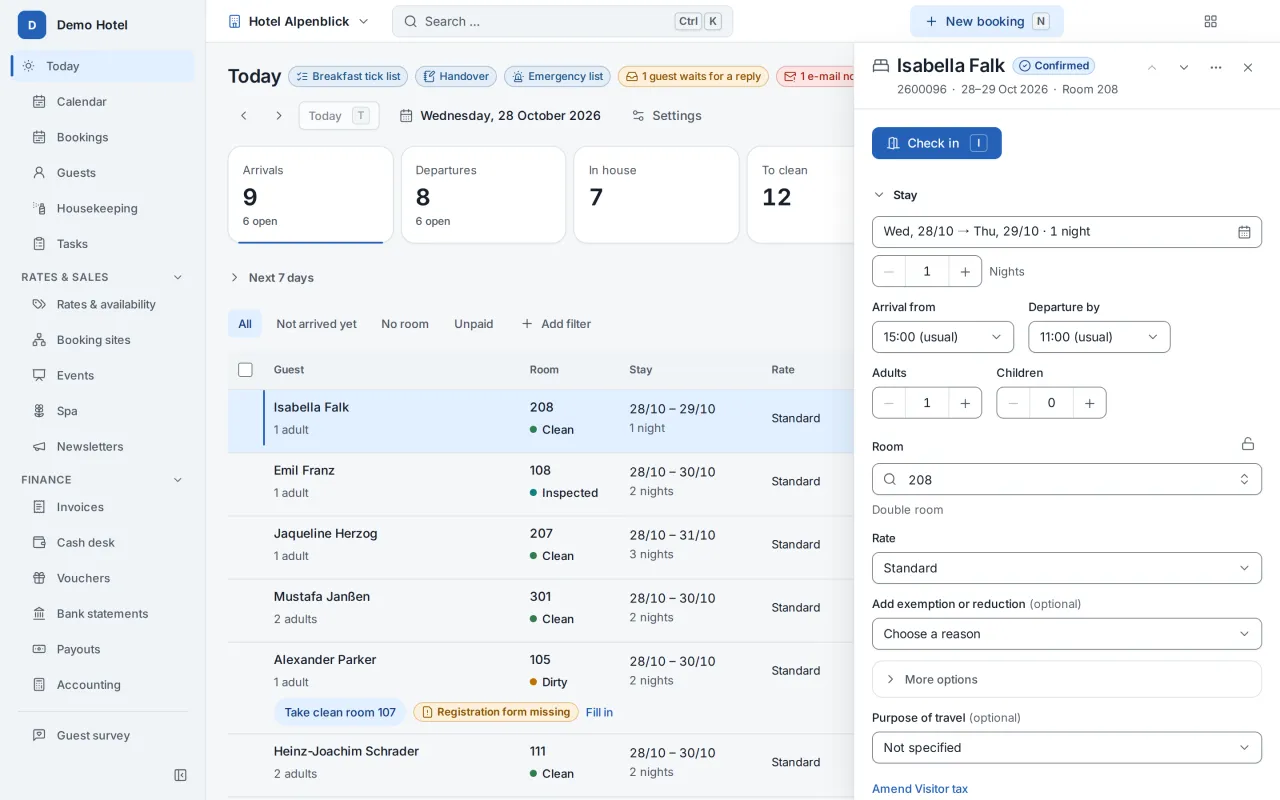
Arrival in one click.
Anything missing – registration form, deposit, room – shows right on the guest and can be fixed there.
- Registration form signed on screen
- Online check-in before arrival
- Self check-in with an access code
1 tap
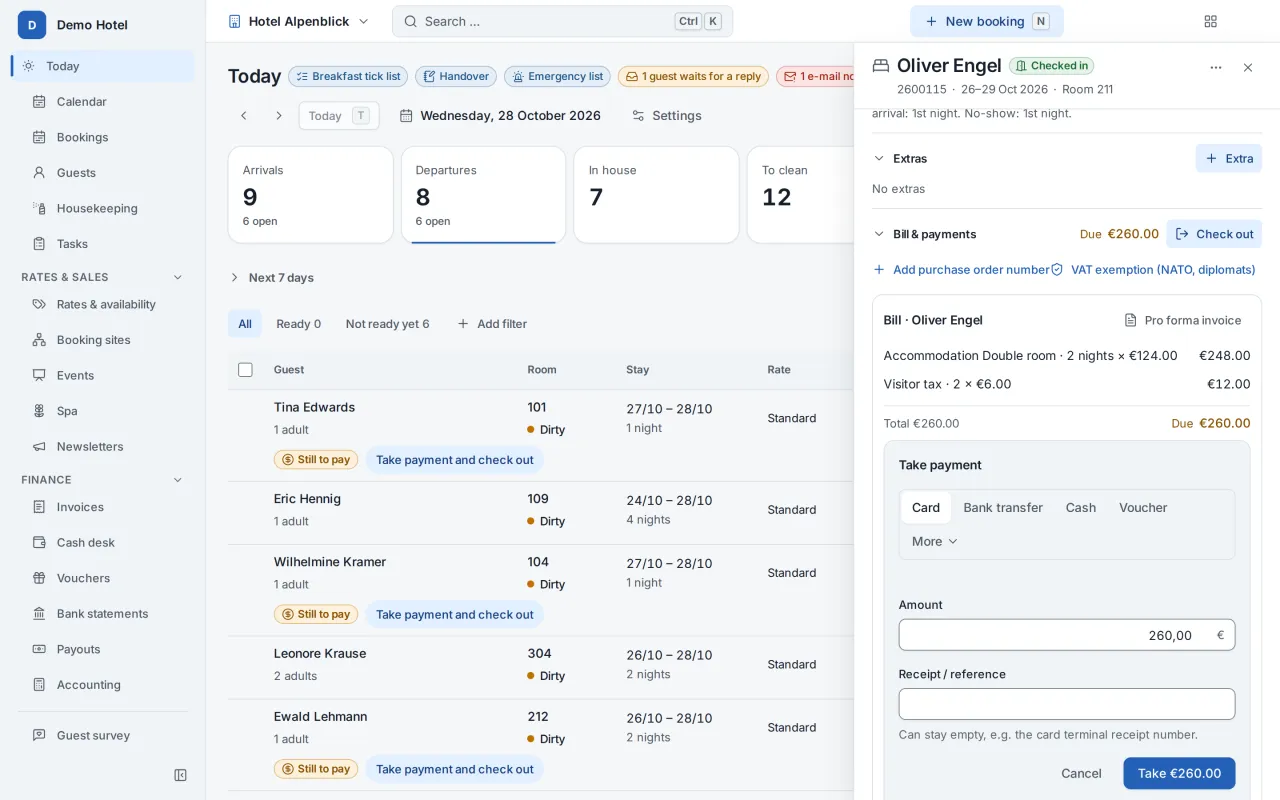
Record payments without leaving the guest.
Cash, card on your own terminal or bank transfer – recorded in one tap, deposits and security deposits included.
- Mark a transfer as paid in one tap
- Instalments and deposits in view
- Online payment prepared: Built into Destmio; the connection to the provider is not switched on yet.
1 tap
Room clean? One tap on the phone.
Housekeeping sees their rooms on the phone and reports them in one tap – even offline. The front desk sees it instantly.
- Tasks between departure and arrival
- Outside cleaners via a link
- Maintenance reports with photos
1 click at check-out
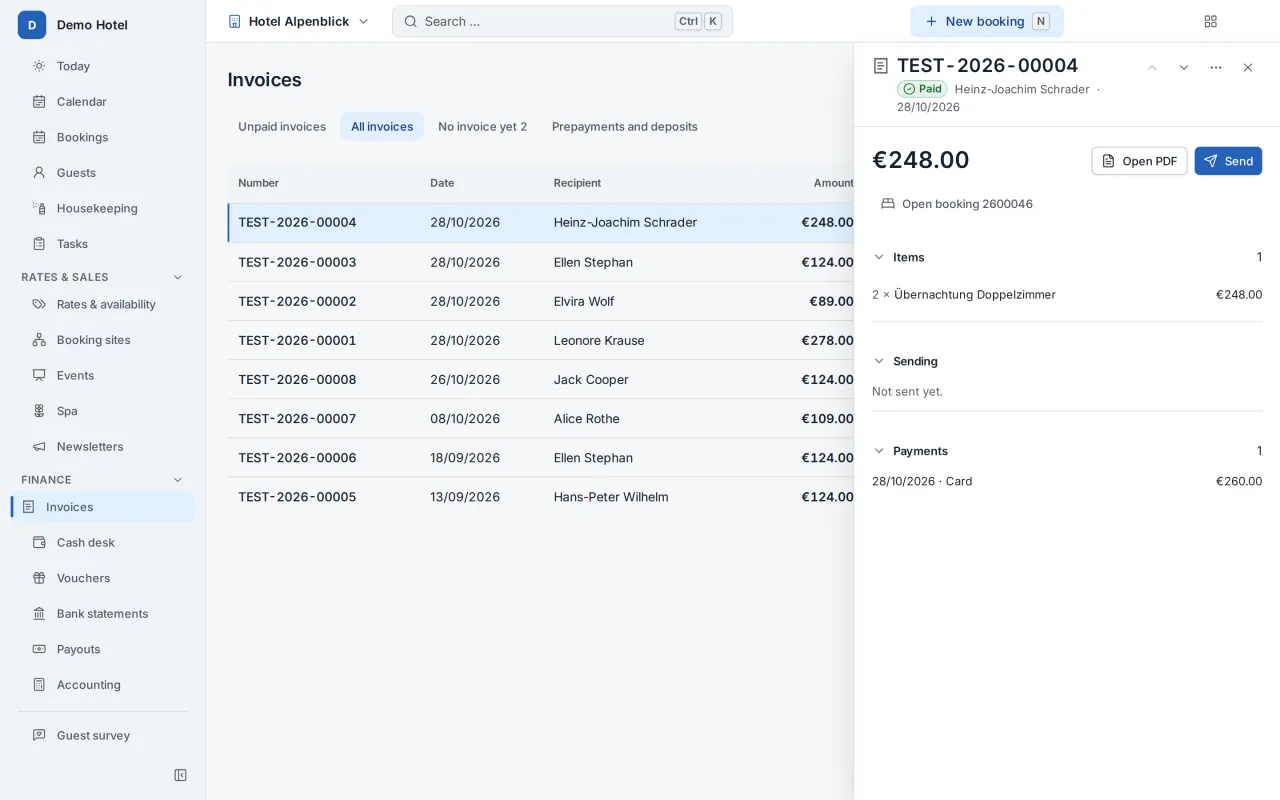
Invoices that can’t be changed after the fact.
Every invoice gets a gapless number and is locked once issued; corrections go through a cancellation invoice. As XRechnung or ZUGFeRD if needed – in the guest’s language.
- Exports for DATEV, BMD and RZL
- VAT by date of service
- Data export for tax audits
Try it yourself
One booking, one gesture. Try it yourself.
Drag a booking to another room or other days – or drag across free nights. In the real booking calendar the same gesture opens the booking, already filled in.
Drag a booking – or across free nights.
With the keyboard: arrow keys choose a night, Enter picks up a booking or starts a new one, arrow keys move it, Enter drops it, Esc cancels.
Sample data – nothing is saved.
Built for Germany and Austria
Your legal duties are already built in.
Destmio knows guest registration in both countries, local city taxes, both countries’ VAT rates and the formats your tax adviser works with.
-
Locked invoices
Gapless number ranges, a checksum over the content, cancellation instead of deletion, a complete audit trail.
-
E-invoicing
ZUGFeRD and XRechnung for Germany, ebInterface for public-sector buyers in Austria.
-
Guest registration
Digital registration form in Germany, guest sheet and guest register in Austria – with retention and deletion periods.
-
City tax
Per person, per night or as a percentage, with reductions and exemptions; included in the price or added on top – as you decide.
-
VAT for DE and AT
7 and 19% in Germany, 10, 13 and 20% in Austria – by date of service.
-
Accounting
Exports for DATEV, BMD and RZL using your chart of accounts (SKR03 or SKR04).
prepared: Built into Destmio; the connection to the provider is not switched on yet. Prepared: connection to a TSE and to the RKSV signature service, sending e-invoices via Peppol.
As of 29 October 2026. Destmio helps you meet your duties; your tax adviser judges your individual case.
Everyday use
Fast for pros. Simple for everyone.
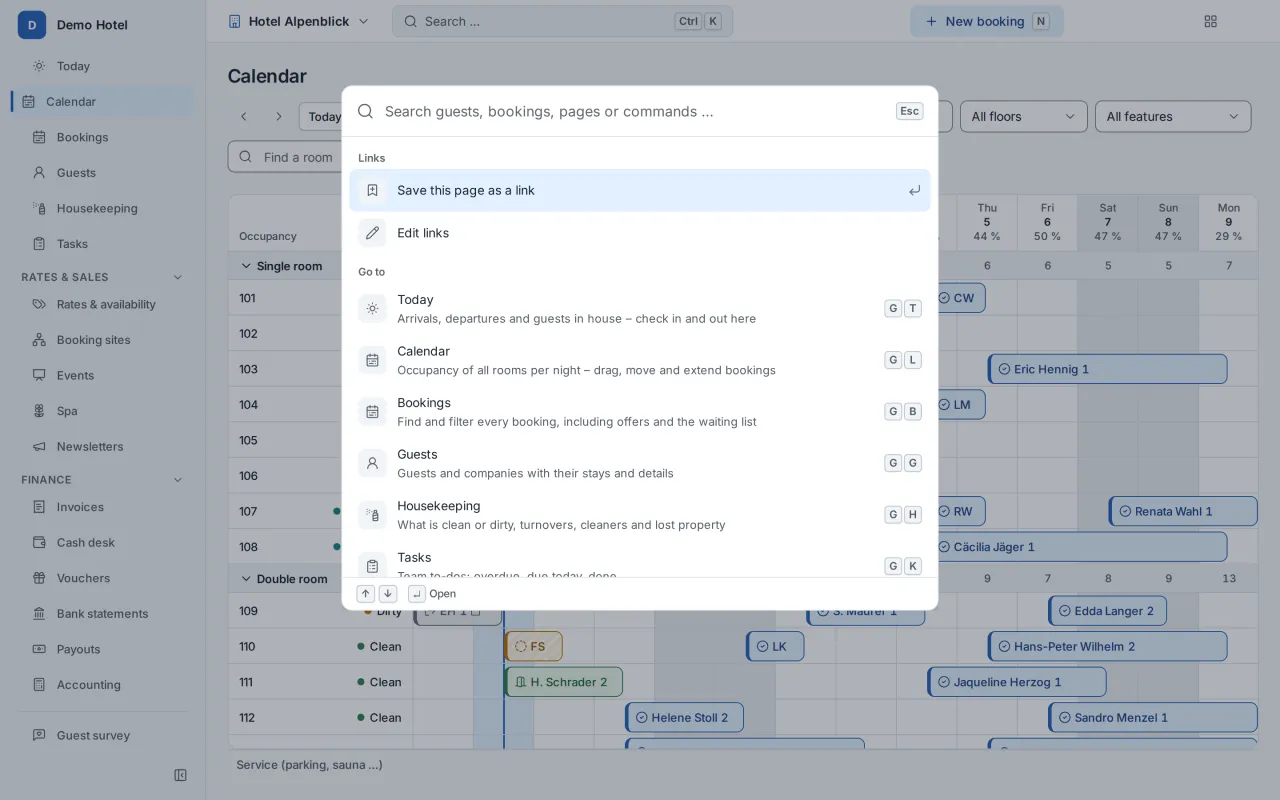
Everything with Ctrl+K Ctrl K
Find guests, bookings and actions without hunting – with shortcuts for every daily task.
As an app on phone and tablet
Installable, with notifications for new bookings; housekeeping keeps working offline.
-
Live on every screen
When a room is reported clean or a booking moves, everyone sees it at once – no reloading.
-
Familiar for switchers
Coming from another system? Choose the classic work style with familiar navigation and shortcuts.
-
Light, dark, compact
Everyone picks their own look and language – German or English.
-
Simple mode
For a few apartments: calendar, tasks and payments on one page – everything else stays out of the way.
Direct bookings
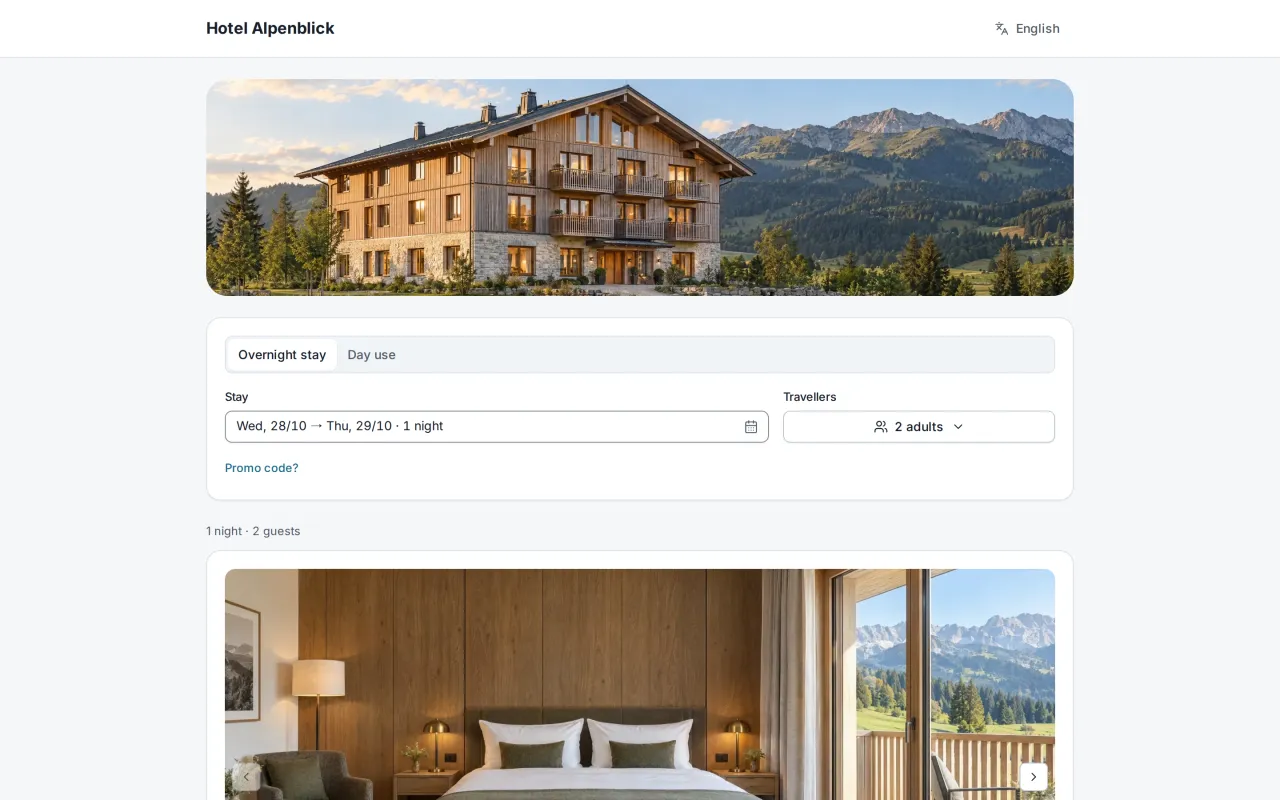
Your own booking page. In your own design.
Guests book in three steps at most, see the total including mandatory fees and read everything in German or English.
-
For any website
Embed it with a widget, a script or the WordPress plugin – or use a ready-made website from Destmio.
-
Online check-in and guest folder
Collect details in advance; Wi-Fi, house rules and directions in one digital place.
-
Built for accessibility
The booking page is built to WCAG 2.1 AA – relevant for the European Accessibility Act.
-
Extras and offers
Add-ons, promo codes and offers the guest accepts online.
-
For any website
Embed it with a widget, a script or the WordPress plugin – or use a ready-made website from Destmio.
-
Online check-in and guest folder
Collect details in advance; Wi-Fi, house rules and directions in one digital place.
-
Built for accessibility
The booking page is built to WCAG 2.1 AA – relevant for the European Accessibility Act.
-
Extras and offers
Add-ons, promo codes and offers the guest accepts online.
Connections
Open to the rest of your tools.
Available today
- iCal sync per room or apartment
- Partner API and webhooks
- Exports for DATEV, BMD and RZL
- WordPress plugin
- Export of all your data
Prepared
- Channel manager for booking sites prepared: Built into Destmio; the connection to the provider is not switched on yet.
- Online payment prepared: Built into Destmio; the connection to the provider is not switched on yet.
- TSE and RKSV prepared: Built into Destmio; the connection to the provider is not switched on yet.
- Sending e-invoices prepared: Built into Destmio; the connection to the provider is not switched on yet.
“Prepared” means the feature is built into Destmio; the connection to the provider is not switched on yet.
Security
Your data stays yours.
-
Hosted in Germany
A data centre in Germany; backups with regularly tested restores.
-
A database of your own
Your data is kept apart from other companies; sensitive data is encrypted on top.
-
Sign in with a passkey
Two-factor sign-in and passkeys for every account, if you want them.
-
Nothing without your consent
Support only sees your data when you approve – for a limited time and logged.
-
Take it with you
Export all your data and invoices yourself, whenever you want.
Simple pricing
Pricing on request
We tailor the price to your property. Try Destmio free for 14 days first – or write to us.
How long can I try Destmio for free?
Which properties is Destmio for?
Where is my data stored?
Can I work with Booking.com and Airbnb?
What about German bookkeeping rules (GoBD)?
How do I switch from my current software?
Is there an app?
What does Destmio cost?
Try it with your own property.
New sign-ups are paused right now. Request access – we’ll be in touch as soon as you can start.
After you click
- Create your company – name, email, password.
- Confirm your email with a code while your company is set up.
- Set up your first property and get going.